
SHINJUKU 1988 Script | Fishing Bot | No Key, Auto Fish, Auto Recast
207 Views

Keyless
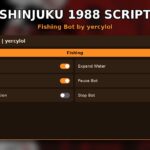
This Fishing Bot for SHINJUKU 1988 was shared on ScriptBlox by yercylol, and it is a simple keyless auto fishing loop. Equip your Fishing Rod, cast once by hand, hit SET CAST POS, then press START BOT and it keeps recasting to that spot and plays the reel minigame for you. Press P to pause and X to kill it. The Expand Water button makes the fishing area bigger, but turning it back sets a fixed size instead of the original one!!
_G.FishingActive = false
_G.KillScript = false
_G.SavedCastPos = nil
_G.WaterModified = false
local VIM = game:GetService("VirtualInputManager")
local LP = game:GetService("Players").LocalPlayer
local PlayerGui = LP:WaitForChild("PlayerGui")
local UIS = game:GetService("UserInputService")
local lock = false
if PlayerGui:FindFirstChild("CD_V42") then PlayerGui.CD_V42:Destroy() end
local sg = Instance.new("ScreenGui", PlayerGui); sg.Name = "CD_V42"; sg.ResetOnSpawn = false
local main = Instance.new("Frame", sg); main.Size = UDim2.new(0, 220, 0, 260); main.Position = UDim2.new(0, 50, 0.5, -130); main.BackgroundColor3 = Color3.fromRGB(10, 10, 15); main.BorderSizePixel = 0
Instance.new("UICorner", main).CornerRadius = UDim.new(0, 10)
local function Terminate()
 _G.FishingActive = false
 _G.KillScript = true
 VIM:SendMouseButtonEvent(0, 0, 0, false, game, 0)
 sg:Destroy()
end
local kill = Instance.new("TextButton", main); kill.Size = UDim2.new(0, 30, 0, 30); kill.Position = UDim2.new(1, -35, 0, 5); kill.Text = "✕"; kill.TextColor3 = Color3.fromRGB(255, 60, 60); kill.BackgroundTransparency = 1; kill.TextSize = 25; kill.Font = Enum.Font.GothamBold
kill.MouseButton1Click:Connect(Terminate)
local status = Instance.new("TextLabel", main); status.Size = UDim2.new(1, 0, 0, 30); status.Position = UDim2.new(0, 0, 0, 225); status.Text = "READY [P] PAUSE | [X] KILL"; status.TextColor3 = Color3.new(1,1,1); status.BackgroundTransparency = 1; status.Font = Enum.Font.Code; status.TextSize = 10
local function resolve(obj)
 if not obj then return nil end
 if obj:IsA("ObjectValue") then return obj.Value end
 return obj
end
local setPos = Instance.new("TextButton", main); setPos.Size = UDim2.new(1, -20, 0, 40); setPos.Position = UDim2.new(0, 10, 0, 40); setPos.Text = "SET CAST POS"; setPos.BackgroundColor3 = Color3.fromRGB(45, 50, 65); setPos.TextColor3 = Color3.new(1,1,1); Instance.new("UICorner", setPos)
setPos.MouseButton1Click:Connect(function()
 local rod = LP.Character and LP.Character:FindFirstChild("Fishing Rod")
 local target = rod and (rod:FindFirstChild("FishHook") or rod:FindFirstChild("FishingLine"))
 local realPart = resolve(target)

 if realPart and (realPart:IsA("BasePart") or realPart:IsA("MeshPart")) then
 _G.SavedCastPos = realPart.Position
 setPos.Text = "POS SAVED ✅"; setPos.BackgroundColor3 = Color3.fromRGB(0, 150, 100)
 else
 setPos.Text = "CAST LINE FIRST!"; task.wait(1); setPos.Text = "SET CAST POS"
 end
end)
local master = Instance.new("TextButton", main); master.Size = UDim2.new(1, -20, 0, 40); master.Position = UDim2.new(0, 10, 0, 85); master.Text = "START BOT"; master.BackgroundColor3 = Color3.fromRGB(30, 35, 45); master.TextColor3 = Color3.new(1, 1, 1); Instance.new("UICorner", master)
local function ToggleBot()
 if not _G.SavedCastPos then status.Text = "SET POS FIRST!"; return end
 _G.FishingActive = not _G.FishingActive
 master.Text = _G.FishingActive and "STOP BOT" or "START BOT"
 master.BackgroundColor3 = _G.FishingActive and Color3.fromRGB(60, 40, 40) or Color3.fromRGB(30, 35, 45)
end
master.MouseButton1Click:Connect(ToggleBot)
local waterBtn = Instance.new("TextButton", main); waterBtn.Size = UDim2.new(1, -20, 0, 40); waterBtn.Position = UDim2.new(0, 10, 0, 130); waterBtn.Text = "EXPAND WATER"; waterBtn.BackgroundColor3 = Color3.fromRGB(0, 100, 200); waterBtn.TextColor3 = Color3.new(1, 1, 1); Instance.new("UICorner", waterBtn)
waterBtn.MouseButton1Click:Connect(function()
 local water = workspace:FindFirstChild("Water", true) or workspace:FindFirstChild("Water")
 if water and water:IsA("BasePart") then
 _G.WaterModified = not _G.WaterModified
 if _G.WaterModified then
 water.Size = Vector3.new(600, 16.149999618530273, 600)
 waterBtn.Text = "WATER: EXPANDED"
 else
 water.Size = Vector3.new(100, 10, 100)
 waterBtn.Text = "WATER: DEFAULT"
 end
 else
 waterBtn.Text = "WATER NOT FOUND"; task.wait(1); waterBtn.Text = "EXPAND WATER"
 end
end)
UIS.InputBegan:Connect(function(input, gameProcessed)
 if gameProcessed then return end
 if input.KeyCode == Enum.KeyCode.X then
 Terminate()
 elseif input.KeyCode == Enum.KeyCode.P then
 ToggleBot()
 end
end)
task.spawn(function()
 while not _G.KillScript do
 task.wait(0.01)
 if not _G.FishingActive then continue end
 local mg = PlayerGui:FindFirstChild("FishingMinigame")
 if mg then
 local fishVal = mg:FindFirstChild("Fish", true)
 local reelVal = mg:FindFirstChild("Reel", true)
 local fishObj = resolve(fishVal)
 local reelObj = resolve(reelVal)

 if fishObj and reelObj then
 if fishObj.Position.Y.Scale < reelObj.Position.Y.Scale then
 VIM:SendMouseButtonEvent(0, 0, 0, true, game, 0)
 else
 VIM:SendMouseButtonEvent(0, 0, 0, false, game, 0)
 end
 end
 else
 VIM:SendMouseButtonEvent(0, 0, 0, false, game, 0)
 end
 end
end)
task.spawn(function()
 while not _G.KillScript do
 task.wait(0.7)
 if not _G.FishingActive or not _G.SavedCastPos or lock then continue end

 local rod = LP.Character and LP.Character:FindFirstChild("Fishing Rod")
 if not rod then continue end

 local hook = rod:FindFirstChild("FishHook")
 local isHookOut = hook and resolve(hook) ~= nil
 local minigame = PlayerGui:FindFirstChild("FishingMinigame")
 if isHookOut then
 if minigame then
 lock = true; status.Text = "FISHING..."
 repeat task.wait(0.5) until not PlayerGui:FindFirstChild("FishingMinigame") or _G.KillScript
 task.wait(3.5); lock = false
 else
 status.Text = "WAITING..."; rod.ReelFish:FireServer()
 end
 else
 if not minigame and not lock then
 lock = true; status.Text = "RECASTING..."
 rod.CastLine:FireServer(_G.SavedCastPos)
 task.wait(2.5); lock = false
 end
 end
 end
end)
No reports yet. Tried it? Let other players know.
Script copied! Rate it to help other players.
💡 Pro Tip: Press Ctrl+D to bookmark this page for updated scripts

Check out SHINJUKU 1988 Script | Fishing Bot | No Key, Auto Fish, Auto Recast on Auto Farm Script
SHARE VIA
OR COPY LINK




Comments (0)
Log in to add a comment.