
OP Teleport Player Roblox Universal Script | No Key
124 Views
Keyless
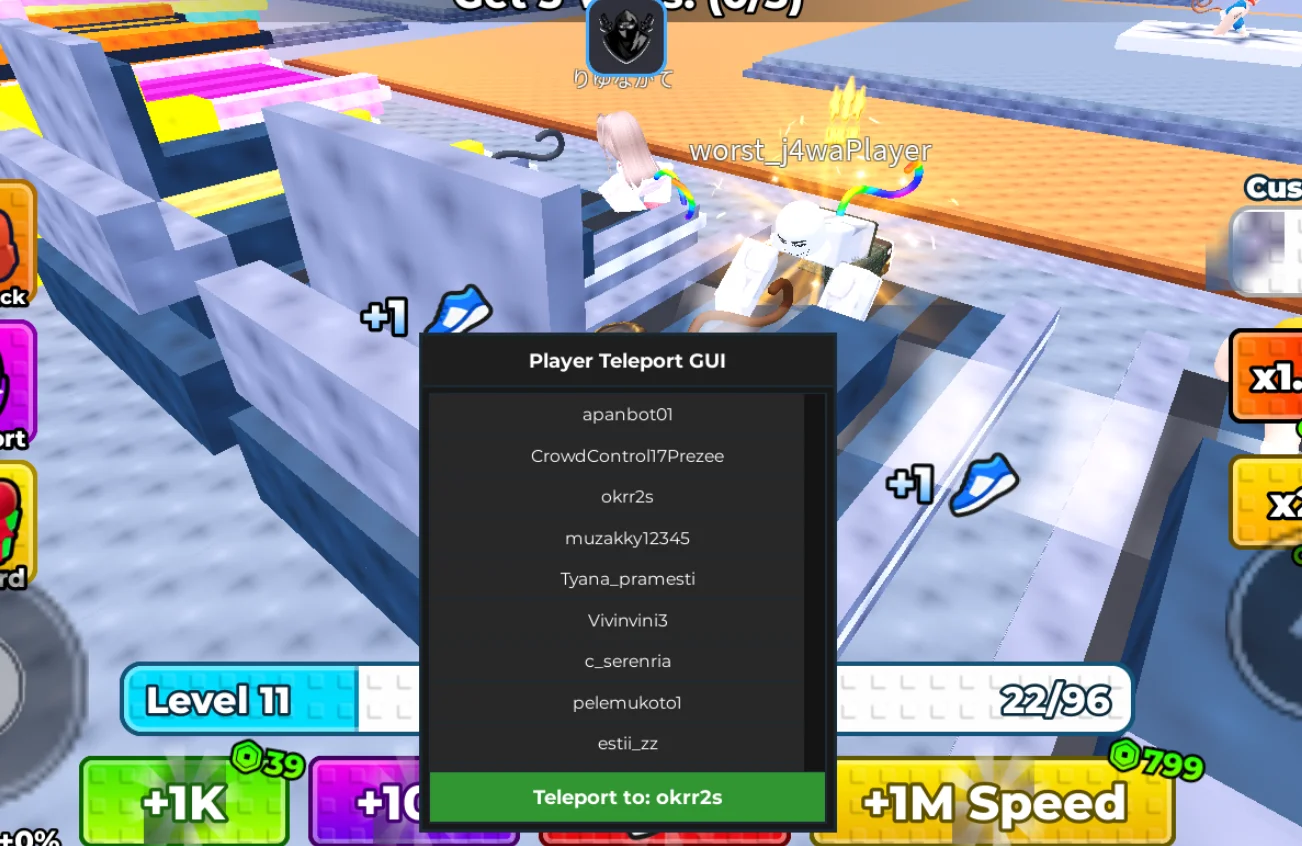
OP Hub is one of the best script for Roblox Games!! Now you can teleport your player within any rbx game to win.
-- Services
local Players = game:GetService("Players")
local UserInputService = game:GetService("UserInputService")
local LocalPlayer = Players.LocalPlayer
local teleportTarget = nil

-- Create GUI
local ScreenGui = Instance.new("ScreenGui")
ScreenGui.Parent = game.CoreGui

local Frame = Instance.new("Frame")
Frame.Size = UDim2.new(0, 250, 0, 300)
Frame.Position = UDim2.new(0.5, -125, 0.4, 0)
Frame.BackgroundColor3 = Color3.fromRGB(25, 25, 25)
Frame.BorderSizePixel = 2
Frame.Parent = ScreenGui

local Title = Instance.new("TextLabel")
Title.Size = UDim2.new(1, 0, 0, 30)
Title.BackgroundColor3 = Color3.fromRGB(30, 30, 30)
Title.Text = "Player Teleport GUI"
Title.TextColor3 = Color3.fromRGB(255, 255, 255)
Title.Font = Enum.Font.GothamBold
Title.TextSize = 14
Title.Parent = Frame

-- Scrolling list
local ScrollingFrame = Instance.new("ScrollingFrame")
ScrollingFrame.Size = UDim2.new(1, -10, 1, -70)
ScrollingFrame.Position = UDim2.new(0, 5, 0, 35)
ScrollingFrame.CanvasSize = UDim2.new(0, 0, 5, 0)
ScrollingFrame.BackgroundColor3 = Color3.fromRGB(20, 20, 20)
ScrollingFrame.Parent = Frame

local UIListLayout = Instance.new("UIListLayout")
UIListLayout.Parent = ScrollingFrame
UIListLayout.SortOrder = Enum.SortOrder.LayoutOrder

-- TP Button
local TPButton = Instance.new("TextButton")
TPButton.Size = UDim2.new(1, -10, 0, 30)
TPButton.Position = UDim2.new(0, 5, 1, -35)
TPButton.BackgroundColor3 = Color3.fromRGB(50, 150, 50)
TPButton.Text = "Teleport"
TPButton.TextColor3 = Color3.fromRGB(255, 255, 255)
TPButton.Font = Enum.Font.GothamBold
TPButton.TextSize = 14
TPButton.Parent = Frame

-- Update player list function
local function updatePlayerList()
    for _, child in pairs(ScrollingFrame:GetChildren()) do
        if child:IsA("TextButton") then
            child:Destroy()
        end
    end
    for _, player in pairs(Players:GetPlayers()) do
        if player ~= LocalPlayer then
            local PlayerButton = Instance.new("TextButton")
            PlayerButton.Size = UDim2.new(1, 0, 0, 25)
            PlayerButton.Text = player.Name
            PlayerButton.TextColor3 = Color3.fromRGB(255, 255, 255)
            PlayerButton.BackgroundColor3 = Color3.fromRGB(40, 40, 40)
            PlayerButton.Font = Enum.Font.Gotham
            PlayerButton.TextSize = 12
            PlayerButton.Parent = ScrollingFrame

            PlayerButton.MouseButton1Click:Connect(function()
                teleportTarget = player.Character and player.Character:FindFirstChild("HumanoidRootPart")
                TPButton.Text = "Teleport to: " .. player.Name
            end)
        end
    end
end

-- Teleport function
TPButton.MouseButton1Click:Connect(function()
    if teleportTarget then
        LocalPlayer.Character:FindFirstChild("HumanoidRootPart").CFrame = teleportTarget.CFrame + Vector3.new(0, 3, 0)
    end
end)

-- Update list on player join/leave
Players.PlayerAdded:Connect(updatePlayerList)
Players.PlayerRemoving:Connect(updatePlayerList)
updatePlayerList()

-- Dragging the GUI
local dragging, dragInput, dragStart, startPos
Title.InputBegan:Connect(function(input)
    if input.UserInputType == Enum.UserInputType.MouseButton1 then
        dragging = true
        dragStart = input.Position
        startPos = Frame.Position
    end
end)

Title.InputChanged:Connect(function(input)
    if input.UserInputType == Enum.UserInputType.MouseMovement then
        dragInput = input
    end
end)

UserInputService.InputChanged:Connect(function(input)
    if input == dragInput and dragging then
        local delta = input.Position - dragStart
        Frame.Position = UDim2.new(startPos.X.Scale, startPos.X.Offset + delta.X, startPos.Y.Scale, startPos.Y.Offset + delta.Y)
    end
end)

Title.InputEnded:Connect(function(input)
    if input.UserInputType == Enum.UserInputType.MouseButton1 then
        dragging = false
    end
end)


Comments (0)
Log in to add a comment.