
AirFlow | Grow a Garden 2 Script | GAG 2
4492 Views
Key System
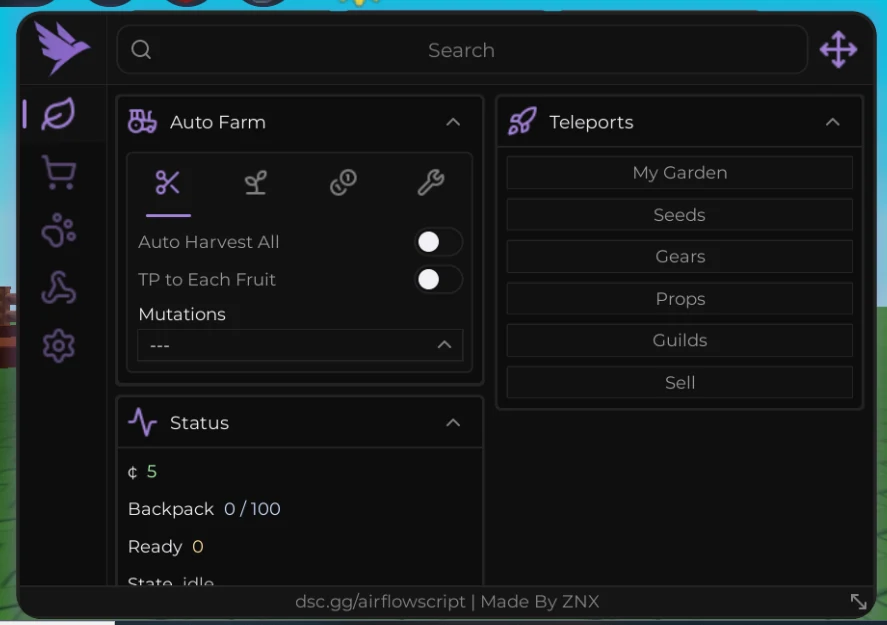
Want to level up faster in Grow a Garden 2? AirFlow is a key system Roblox script that lets you use Auto Farm, Auto Harvest and Fruit Teleport, so you can reach your goals in a fraction of the usual time.
About Grow a Garden 2
Grow a Garden 2 is a gardening game on Roblox built by Strawberreh Squad. You spend your time tending crops and reinvesting the profits. Progress brings a steady stream of crops and seeds. Progress depends on saving up from each harvest for upgrades. So far it has passed 1.7 billion visits.
What AirFlow does in Grow a Garden 2
Auto Farm and Auto Harvest run the core Grow a Garden 2 loop automatically, which saves a lot of clicking. Movement options such as Fruit Teleport get you around Grow a Garden 2 much faster. You also get Player Utilities as part of the AirFlow menu.
How to Use the Grow a Garden 2 Script
Step 1: Open Grow a Garden 2 in Roblox.
Step 2: Launch your executor, such as Delta, Codex or Arceus X.
Step 3: Copy the script from this page and paste it into the executor.
Step 4: Press Execute, wait for the AirFlow menu to load, then turn on the features you want.
Script details
Hub: AirFlow
Key: Key System
Status: Verified & Working
Executors: Delta, Codex, Arceus X
Last tested: June 13, 2026
Does the Grow a Garden 2 script need a key?
Yes, AirFlow uses a key system. When you execute the script, follow the key link it shows, finish the steps in your browser and paste the key into the menu.
No reports yet. Tried it? Let other players know.
Script copied! Rate it to help other players.
💡 Pro Tip: Press Ctrl+D to bookmark this page for updated scripts

Check out AirFlow | Grow a Garden 2 Script | GAG 2 on Auto Farm Script
SHARE VIA
OR COPY LINK




Comments (1)
Log in to add a comment.
jakebayot126
6 months ago
Gg